
Describe what you need
Type your request in plain English. "Add a WooCommerce discount that gives 15% off orders over $100 for logged-in users." The agent handles the rest.
New in v1.3.0
AI Coding Agent
An autonomous AI coding agent built directly into SnipVault. Describe what you want in plain English — the agent writes the PHP, CSS, and JavaScript, tests it in an isolated sandbox, runs a security audit, and asks for your approval before deploying. All without leaving WordPress.
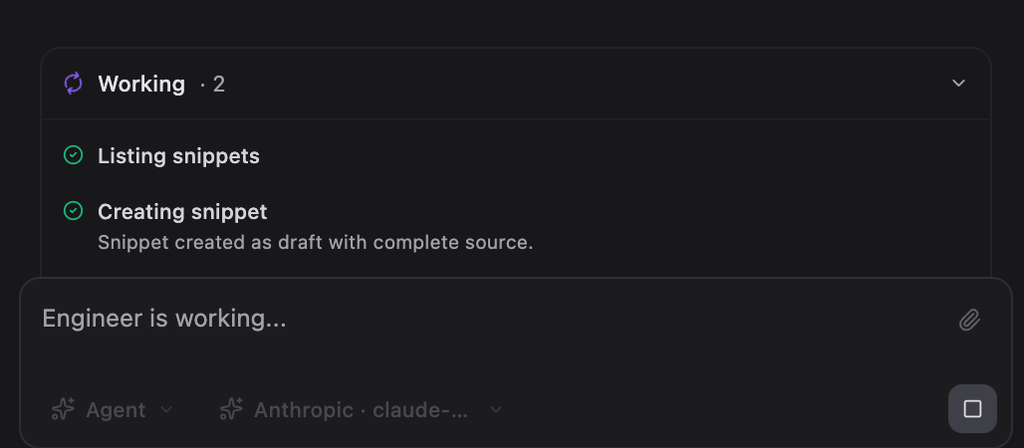
Live agent interface — generates code, tracks progress, saves snippets
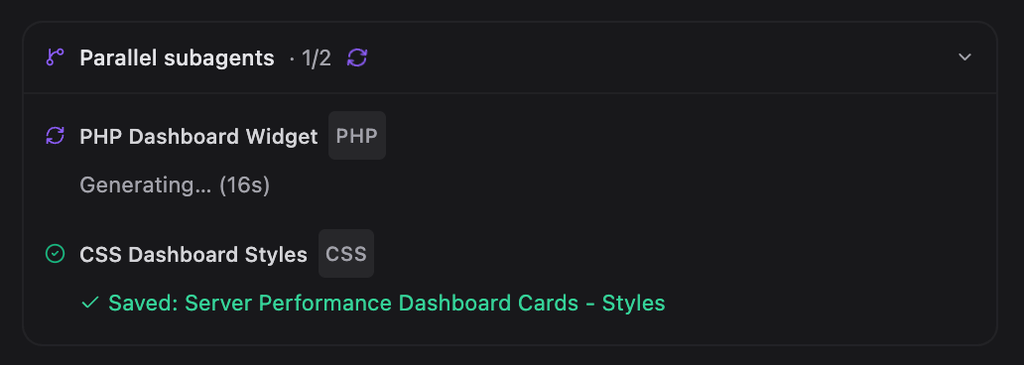
Parallel subagents writing PHP, CSS, and JS simultaneously
How it works
The Snippet Engineer is a multi-step autonomous agent. It doesn't just paste code — it plans, writes, validates, self-corrects, and deploys, with you in control at every decision point.
Type your request in plain English. "Add a WooCommerce discount that gives 15% off orders over $100 for logged-in users." The agent handles the rest.
For multi-file projects, parallel subagents write PHP, CSS, and JS simultaneously. You see each file appear in a live activity card as it's generated.
Before anything goes live, the code runs in an isolated sandbox probe to catch fatal errors. A security risk score is calculated and checked against your configured ceiling.
Every deploy is human-in-the-loop by default. Review the plan, approve the publish, and the agent deploys. If something breaks post-deploy, it automatically rolls back.
Four modes, one panel
The Snippet Engineer lives in a unified side panel accessible from anywhere in SnipVault. Four modes cover different workflows, from fully autonomous builds to quick read-only questions.
Autonomous multi-step builds. The agent plans, writes code, tests in a sandbox, runs a security audit, and asks for your approval before deploying — all without you writing a line.
Conversational help with your snippets. Ask questions, get explanations, request refactors. The agent can read and modify snippets directly in the conversation.
Read-only questions about your snippet library. Ask about what hooks a snippet uses, how it interacts with other code, or what a function does — no changes, just answers.
Review a proposed approach before execution. The agent lays out exactly what it plans to do, and waits for your go-ahead before writing a single line of code.
Context mentions
Type @ in the composer and autocomplete surfaces snippets, projects, hooks, and plugins from your library. Point the agent at exactly the right code for the task — no ambiguity, no over-broad context.
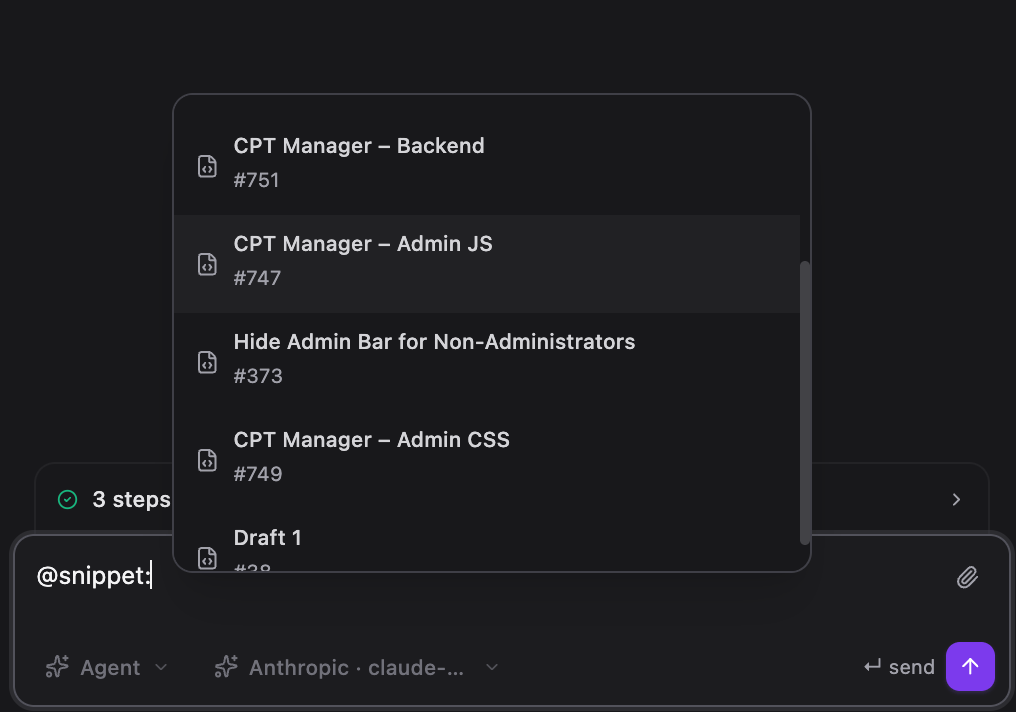
@-mention any snippet, project, hook, or plugin
Capabilities
Multi-file requests fan out across 2–4 focused code-generation jobs running simultaneously. Each saves its output the moment it finishes — files are written in parallel, not sequentially.
Every deploy enforces sandbox testing and a security risk score check. You configure the risk ceiling. The agent cannot publish code that fails the audit.
Type @ in the composer to reference specific snippets, projects, hooks, or plugins. The agent gets exactly the right context for the task.
Token-by-token streaming means you watch code appear in real time. No waiting for a spinner — see the agent's thinking and output as it's generated.
The agent knows your active project's folder structure. Ask it to scaffold an entire WooCommerce customization workspace with separate snippets for pricing, cart, and emails.
Switch between Anthropic, OpenAI, xAI (Grok), and Google Gemini from the composer. Change models mid-conversation without losing context.
Every write, deploy, rollback, and filesystem action is signed and logged. Full traceability for teams and agencies who need to know exactly what ran.
For lower-risk work, enable autopilot to let the agent deploy without a per-request approval prompt. All other security gates still apply.
Also new in v1.3.0
Projects group related snippets and folders into self-contained workspaces. The agent is fully project-aware — it knows your active project's folder tree and can scaffold an entire workspace for you. Ask it to "set up a WooCommerce project with snippets for pricing, cart, and email templates" and it'll build the whole structure.
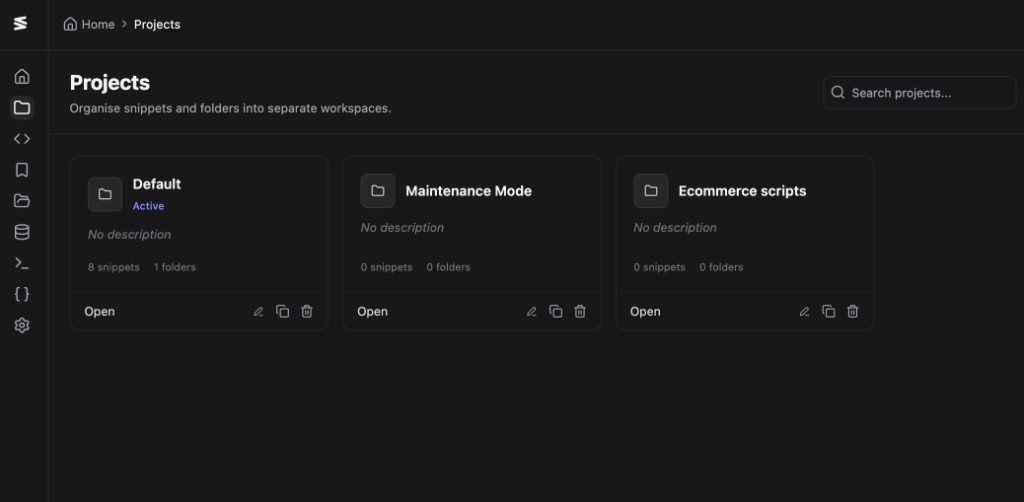
Project workspaces with dedicated folder trees and snippet lists
Built for production
The Snippet Engineer is designed for professional WordPress environments. Every deploy goes through server-enforced gates — not optional, not bypassable.
Code runs in an isolated probe request before deployment. Fatal PHP errors are caught here — before they can reach your live site.
Every snippet gets a risk score from the security audit engine. Your configured ceiling is enforced at deploy time — the agent cannot publish code that exceeds it.
Deploy approval is always required by default. The agent asks, you confirm. Full audit log, signed deploy tokens, and filesystem path restrictions protect every run.
That's the right mental model. Cursor is an AI-native IDE for general development. The Snippet Engineer brings the same autonomous agent experience — multiple modes, parallel subagents, context mentions, live streaming — directly into the WordPress admin, purpose-built for PHP/CSS/JS snippet workflows.
No, by default every deploy is human-in-the-loop. The agent writes and audits the code, then waits for your explicit approval before publishing. Autopilot mode is available as an opt-in for lower-risk work, and all security gates still apply in autopilot.
The agent automatically rolls back to the previous revision if a deployment causes a failure. The sandbox probe also catches fatal PHP errors before deployment, so most issues are caught before they can reach production.
Yes. For larger requests, the agent fans out across parallel subagents that each write one file simultaneously — PHP handler, CSS stylesheet, JavaScript module — and saves them as separate snippets the moment each one finishes.
You can connect Anthropic (Claude), OpenAI (GPT-4o, o1), xAI (Grok), and Google Gemini. The model picker is in the composer — switch providers or models mid-conversation.
The security posture is designed for production. Sandbox testing, security audit risk scoring, human-in-the-loop approval, signed deploy tokens, filesystem path restrictions, and a full audit log are all enforced before any code goes live.
Get started
The Snippet Engineer is included in every SnipVault plan. One-time purchase, lifetime updates.